const screens = [
  {
    id: "dashboard",
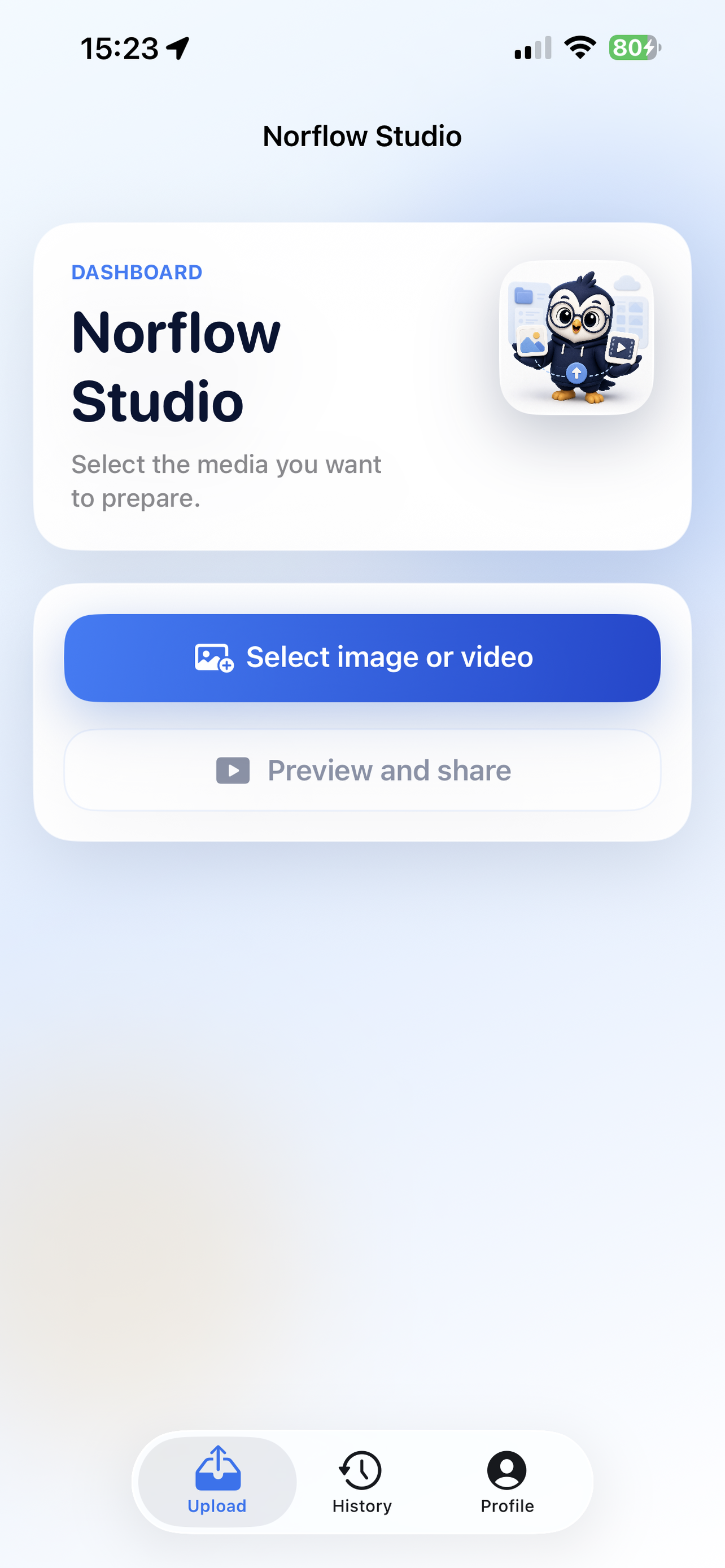
    label: "Select",
    icon: "image-plus",
    image: "assets/dashboard.png",
    alt: "Norflow Studio dashboard screen with a Select image or video action.",
    title: "Start from the media itself.",
    copy: "The first action is direct: choose the photo or video you want to prepare, then move into preview when it is ready."
  },
  {
    id: "preview",
    label: "Preview",
    icon: "scan-eye",
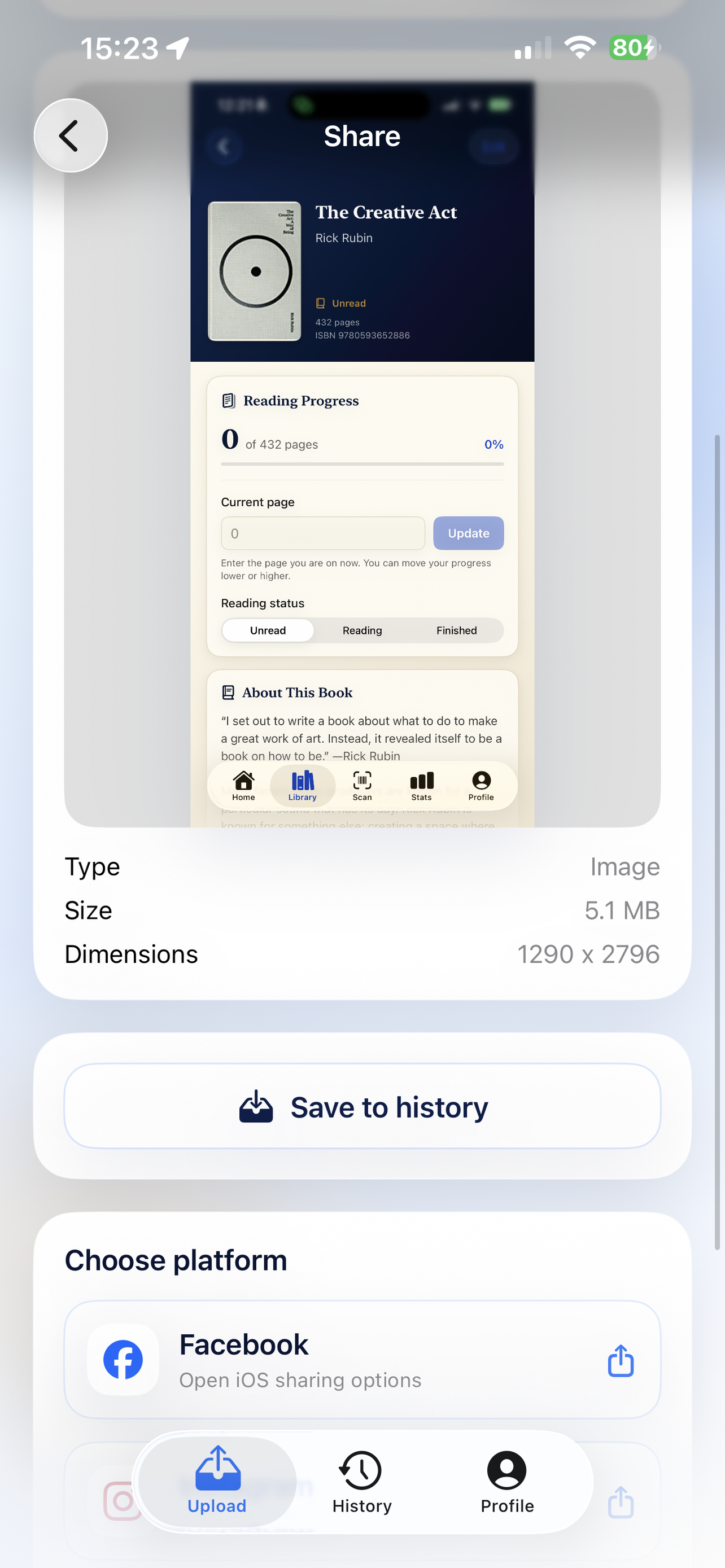
    image: "assets/preview-share.png",
    alt: "Norflow Studio preview screen showing media details, save to history, and platform share rows.",
    title: "Review before it leaves your phone.",
    copy: "Preview the selected item, check type, size, and dimensions, then save it or open the relevant iOS sharing options."
  },
  {
    id: "history",
    label: "History",
    icon: "history",
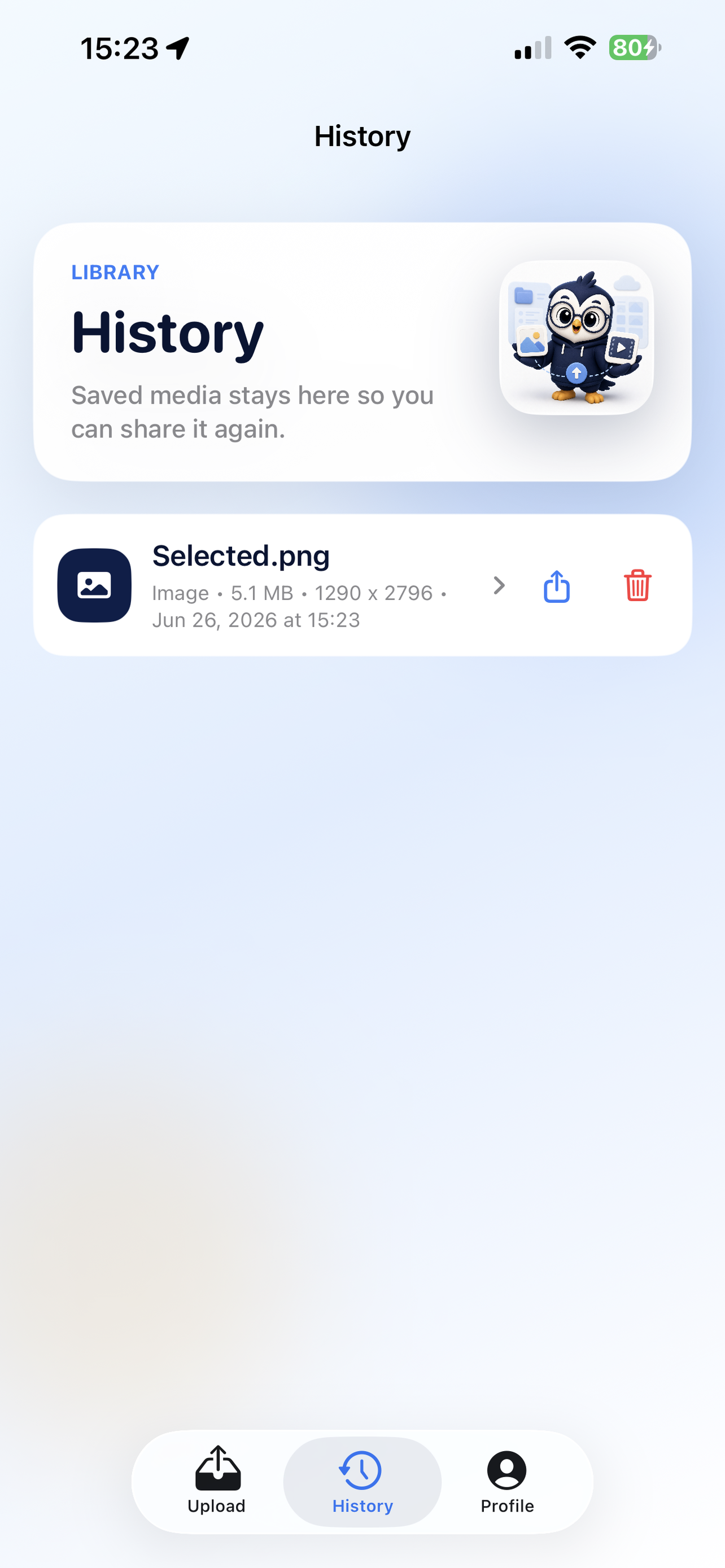
    image: "assets/history.png",
    alt: "Norflow Studio history screen with a saved media item.",
    title: "Recent media stays reachable.",
    copy: "Saved media history keeps repeat sharing from becoming a reset. Open a recent item, share again, or remove it."
  },
  {
    id: "profile",
    label: "Profile",
    icon: "user-round",
    image: "assets/profile.png",
    alt: "Norflow Studio profile screen with account details, sign out, and delete account actions.",
    title: "Account controls stay plain.",
    copy: "Profile, sign out, and delete-account controls are kept visible and practical, with saved app data handled from the account flow."
  }
];

const workflowSteps = [
  ["image-plus", "Select", "Pick an image or video from your Photos library without building a campaign around it."],
  ["scan-eye", "Inspect", "Preview the media and its useful details before deciding where it goes."],
  ["archive", "Save", "Keep recent selections in a local history so repeat sharing stays quick."],
  ["share-2", "Share", "Open the iOS sharing options available for the selected media and platform."],
];

const features = [
  ["smartphone", "Made for the phone workflow", "The interface stays close to the actual iPhone loop: choose, preview, save, share, and get back to work."],
  ["ruler", "Useful media details", "Type, file size, and dimensions are visible where they matter, beside the selected item."],
  ["folder-clock", "Local recent history", "A saved-media shelf gives creators a way back to recent items without hunting through Photos again."],
  ["send", "Platform-aware sharing", "Share options stay tied to the selected media, with a practical handoff into standard iOS sharing."],
  ["badge-check", "Clear account surface", "Profile, sign out, and deletion controls are not buried inside a maze of settings."],
  ["sparkles", "Premium but quiet", "The visual system uses crisp cards, calm gradients, and app-native imagery instead of a generic SaaS wrapper."],
];

function Icon({ name }) {
  return <i data-lucide={name} aria-hidden="true"></i>;
}

function Navigation() {
  return (
    <nav className="nav" aria-label="Primary navigation">
      <a className="brand" href="https://belenorchiklabs.com/" aria-label="Back to Belenorchik Labs home">
        <img src="assets/app-icon.png" width="1024" height="1024" alt="" />
        <span>Norflow Studio</span>
      </a>
      <div className="nav-links">
        <a href="#workflow">Workflow</a>
        <a href="#screens">Screens</a>
        <a href="https://norflow-studio.belenorchiklabs.com/privacy.html">Privacy</a>
        <a href="https://norflow-studio.belenorchiklabs.com/terms.html">Terms</a>
      </div>
    </nav>
  );
}

function Hero() {
  return (
    <section className="hero" aria-labelledby="hero-title">
      <div className="hero-media" aria-hidden="true">
        <div className="device tertiary">
          <img src="assets/history.png" width="1284" height="2778" alt="" />
        </div>
        <div className="device primary">
          <img src="assets/dashboard.png" width="1284" height="2778" alt="" />
        </div>
        <div className="device secondary">
          <img src="assets/preview-share.png" width="1284" height="2778" alt="" />
        </div>
      </div>

      <div className="hero-copy">
        <p className="eyebrow">iPhone media workflow and publishing helper</p>
        <h1 id="hero-title">Norflow Studio</h1>
        <p className="lead">
          Norflow Studio is an iPhone app that helps creators select photos or videos, preview media details, save recent media locally, and share or publish selected content to the platforms they choose.
        </p>
        <div className="hero-actions">
          <a className="button" href="#screens">
            <Icon name="images" />
            See the app
          </a>
          <a className="button secondary" href="#workflow">
            <Icon name="route" />
            View workflow
          </a>
        </div>
        <div className="hero-proof" aria-label="Core workflow">
          <span className="meta-chip"><Icon name="image" />Photos and videos</span>
          <span className="meta-chip"><Icon name="archive" />Local history</span>
          <span className="meta-chip"><Icon name="share-2" />Share or publish</span>
        </div>
      </div>
    </section>
  );
}

function WorkflowSection() {
  return (
    <section className="workflow" id="workflow" aria-labelledby="workflow-title">
      <div className="section-inner">
        <div className="section-heading">
          <p className="eyebrow">Creator operations</p>
          <h2 id="workflow-title">One clean loop from camera roll to share sheet.</h2>
          <p>Norflow Studio exists to make the posting preparation step clearer: choose media from your device, inspect it, keep it in a local recent history, then share through iOS or publish through connected social accounts when you decide to use them.</p>
        </div>
        <div className="workflow-grid">
          {workflowSteps.map(([icon, title, text]) => (
            <article className="workflow-item" key={title}>
              <span className="tile-icon"><Icon name={icon} /></span>
              <h3>{title}</h3>
              <p>{text}</p>
            </article>
          ))}
        </div>
      </div>
    </section>
  );
}

function ScreenGallery() {
  const [activeIndex, setActiveIndex] = React.useState(0);
  const active = screens[activeIndex];

  return (
    <section className="gallery" id="screens" aria-labelledby="screens-title">
      <div className="section-inner gallery-layout">
        <aside className="screen-copy">
          <img src="assets/app-icon.png" width="1024" height="1024" alt="" />
          <p className="eyebrow">Actual app screens</p>
          <h2 id="screens-title">The product surface stays visible.</h2>
          <p>{active.copy}</p>
          <div className="screen-tabs" role="tablist" aria-label="Choose screenshot">
            {screens.map((screen, index) => (
              <button
                key={screen.id}
                className={`screen-tab ${index === activeIndex ? "active" : ""}`}
                type="button"
                role="tab"
                aria-label={screen.label}
                aria-selected={index === activeIndex}
                onClick={() => setActiveIndex(index)}
              >
                <Icon name={screen.icon} />
                <span>{screen.label}</span>
              </button>
            ))}
          </div>
        </aside>

        <div className="gallery-visual">
          <div className="screen-stage" aria-live="polite" aria-label={`${active.label} app screenshot`}>
            <div className="screen-orbit" aria-hidden="true"></div>
            <figure className="phone-shot primary-shot">
              <img src={active.image} width="1284" height="2778" alt={active.alt} />
            </figure>
            <div className="screen-preview-rail" aria-label="More app screens">
              {screens.map((screen, index) => (
                <button
                  key={screen.id}
                  className={`screen-preview ${index === activeIndex ? "active" : ""}`}
                  type="button"
                  aria-label={`Show ${screen.label} screenshot`}
                  aria-current={index === activeIndex ? "true" : undefined}
                  onClick={() => setActiveIndex(index)}
                >
                  <img src={screen.image} width="1284" height="2778" alt="" loading={index === 0 ? undefined : "lazy"} />
                  <span>{screen.label}</span>
                </button>
              ))}
            </div>
          </div>
          <div className="caption-stack">
            <div className="caption">
              <strong>{active.title}</strong>
              <span>{active.copy}</span>
            </div>
            <div className="caption">
              <strong>Quiet by design.</strong>
              <span>The page uses the app's own screenshots, icon, and premium blue-and-gold visual language rather than a disconnected marketing skin.</span>
            </div>
          </div>
        </div>
      </div>
    </section>
  );
}

function FeaturesSection() {
  return (
    <section className="features" aria-labelledby="features-title">
      <div className="section-inner">
        <div className="section-heading">
          <p className="eyebrow">Why it exists</p>
          <h2 id="features-title">A practical workspace for creators who already have a rhythm.</h2>
          <p>The app's purpose is to give creators a dedicated place to prepare user-selected media, manage recent selections, and control where content is shared or published.</p>
        </div>
        <div className="feature-grid">
          {features.map(([icon, title, text]) => (
            <article className="feature" key={title}>
              <span className="tile-icon"><Icon name={icon} /></span>
              <strong>{title}</strong>
              <p>{text}</p>
            </article>
          ))}
        </div>
      </div>
    </section>
  );
}

function DataUseSection() {
  return (
    <section className="data-use" id="data-use" aria-labelledby="data-use-title">
      <div className="section-inner data-use-layout">
        <div className="section-heading">
          <p className="eyebrow">Google and YouTube access</p>
          <h2 id="data-use-title">YouTube data is used only for actions you start.</h2>
          <p>
            Norflow Studio can optionally connect a YouTube account when you choose to publish through YouTube. The purpose of this access is to identify the connected channel, check available upload or privacy options, upload only the media and metadata you select, and show publish status for actions you start.
          </p>
        </div>
        <aside className="data-use-note" aria-label="Google data use summary">
          <span className="tile-icon"><Icon name="shield-check" /></span>
          <strong>No background publishing.</strong>
          <p>Norflow Studio does not publish to YouTube unless you choose media, choose the YouTube account and options, and start a publish action in the app.</p>
          <a className="footer-link" href="https://norflow-studio.belenorchiklabs.com/privacy.html">
            Read Privacy Policy
            <Icon name="arrow-up-right" />
          </a>
        </aside>
      </div>
    </section>
  );
}

function ClosingSection() {
  return (
    <section className="closing" aria-labelledby="closing-title">
      <div className="section-inner closing-layout">
        <div>
          <p className="eyebrow">Belenorchik Labs</p>
          <h2 id="closing-title">Premium, natural, and close to the real app.</h2>
          <p>Norflow Studio keeps its promise modest and useful: a clear media preparation flow, real screenshot evidence, and legal/support links that stay easy to reach.</p>
        </div>
        <aside className="legal-note">
          <h3>Helpful links</h3>
          <p>Open the Belenorchik Labs home page or review the Norflow Studio legal pages.</p>
          <div className="legal-links">
            <a className="footer-link" href="https://belenorchiklabs.com/">
              Home
              <Icon name="arrow-up-right" />
            </a>
            <a className="footer-link" href="https://norflow-studio.belenorchiklabs.com/privacy.html">
              Privacy Policy
              <Icon name="arrow-up-right" />
            </a>
            <a className="footer-link" href="https://norflow-studio.belenorchiklabs.com/terms.html">
              Terms of Service
              <Icon name="arrow-up-right" />
            </a>
          </div>
        </aside>
      </div>
    </section>
  );
}

function SiteFooter() {
  return (
    <footer className="site-footer">
      <div className="footer-inner">
        <strong>Norflow Studio</strong>
        <span>Copyright 2026 Belenorchik Labs</span>
      </div>
    </footer>
  );
}

function App() {
  React.useEffect(() => {
    if (window.lucide) {
      window.lucide.createIcons();
    }
  });

  return (
    <div className="app-shell">
      <Navigation />
      <main>
        <Hero />
        <WorkflowSection />
        <ScreenGallery />
        <FeaturesSection />
        <DataUseSection />
        <ClosingSection />
      </main>
      <SiteFooter />
    </div>
  );
}

ReactDOM.createRoot(document.getElementById("root")).render(<App />);
